Overview
Iceberg Connector is the connector that Starburst strategically invests into. The aim is to make it our default recommendation for Data Lake Analytics. Because of that it is increasingly important to understand in detail how it works. This article is going to focus specifically on Materialized Views as one of the very important performance features.
History
First of all, it is important to remember, that Materialized Views (MV) implementation in Iceberg Connector is different from MV implementation in Hive Connector. The reason for that is Iceberg MV implementation was designed and developed by Trino OSS community whereas Hive MV implementation was designed and developed by Starburst. Nevertheless Starburst continues enhancing Iceberg MV implementation by adding proprietary features that do not exist in OSS Trino. A recent example is automatic refreshes available starting from 471 STS:
Enabling MVs in Iceberg Connector
Iceberg Materialized VIews are enabled out-of-the box. However, if using BIAC in your SEP cluster, please make sure that the following BIAC configuration is in place:
starburst.access-control.ownership-catalogs=icebergCatalog1,icebergCatalog2
For the details please refer to: Built-in access control overview — Starburst Enterprise
and:
iceberg.security=system
For the details please refer to: Iceberg connector — Starburst Enterprise
since these are very common pitfalls not configure above two properties before you start testing.
Now, that BIAC is in a good shape, let’s look talk about implementation nuances.
Iceberg MV snapshots are by default materialized in the same schema where MV sits, but are hidden. You can change that by setting: iceberg.materialized-views.hide-storage-table=false and then configuring explicit MV storage location using iceberg.materialized-views.storage-schema=<some_schema_name> to make them work more like they do in Hive Connector.
Iceberg MV snapshots are by default materialized in the same schema where MV sits, but are hidden. You can change that by setting: iceberg.materialized-views.hide-storage-table=false and then configuring explicit MV storage location using iceberg.materialized-views.storage-schema=<some_schema_name> to make them work more like they do in Hive Connector.
You can also control access to the newest features of Iceberg MV with the help of:
iceberg.incremental-refresh-enabled=<true>/<false>
iceberg.scheduled-materialized-view-refresh-enabled=<true>/<false>
How to Create MV
To create Iceberg MV you can use our usual syntax:
CREATE MATERIALIZED VIEW <iceberg_catalog>.<schema_name>.<mv_name> …
However, the fact that you have created MV, does not automatically mean you have anything materialized. If you query MV right after creating it - the MV will behave like a usual View. In other words it will be calculating dataset on-flight.
But how does it look at physical level?
S3 storage
Right after creating MV you should see a new Iceberg table created to represent the MV:
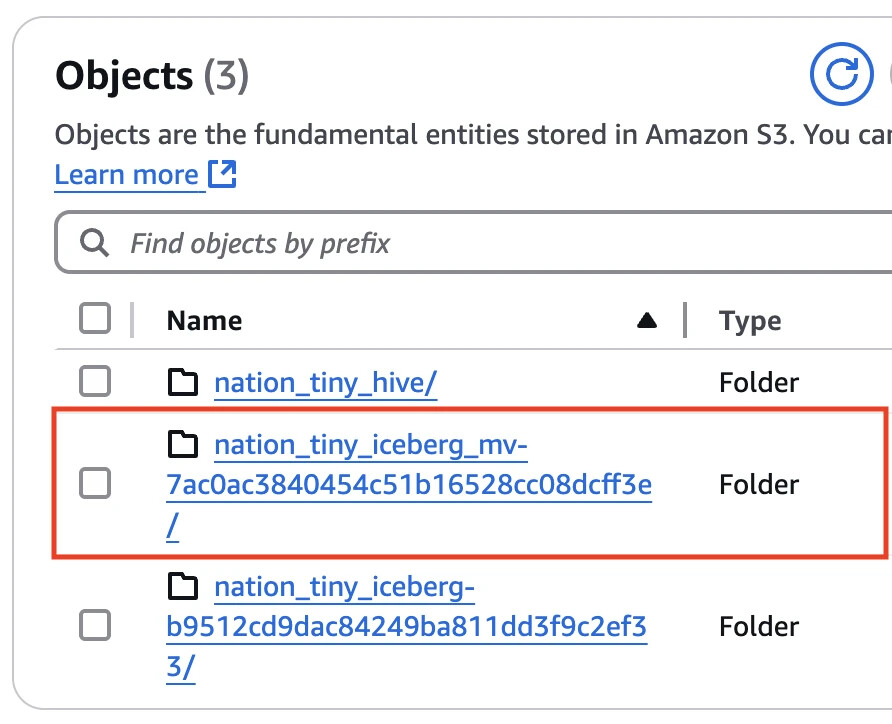
However, if you look inside, you would only see /metadata folder without any /data folder:
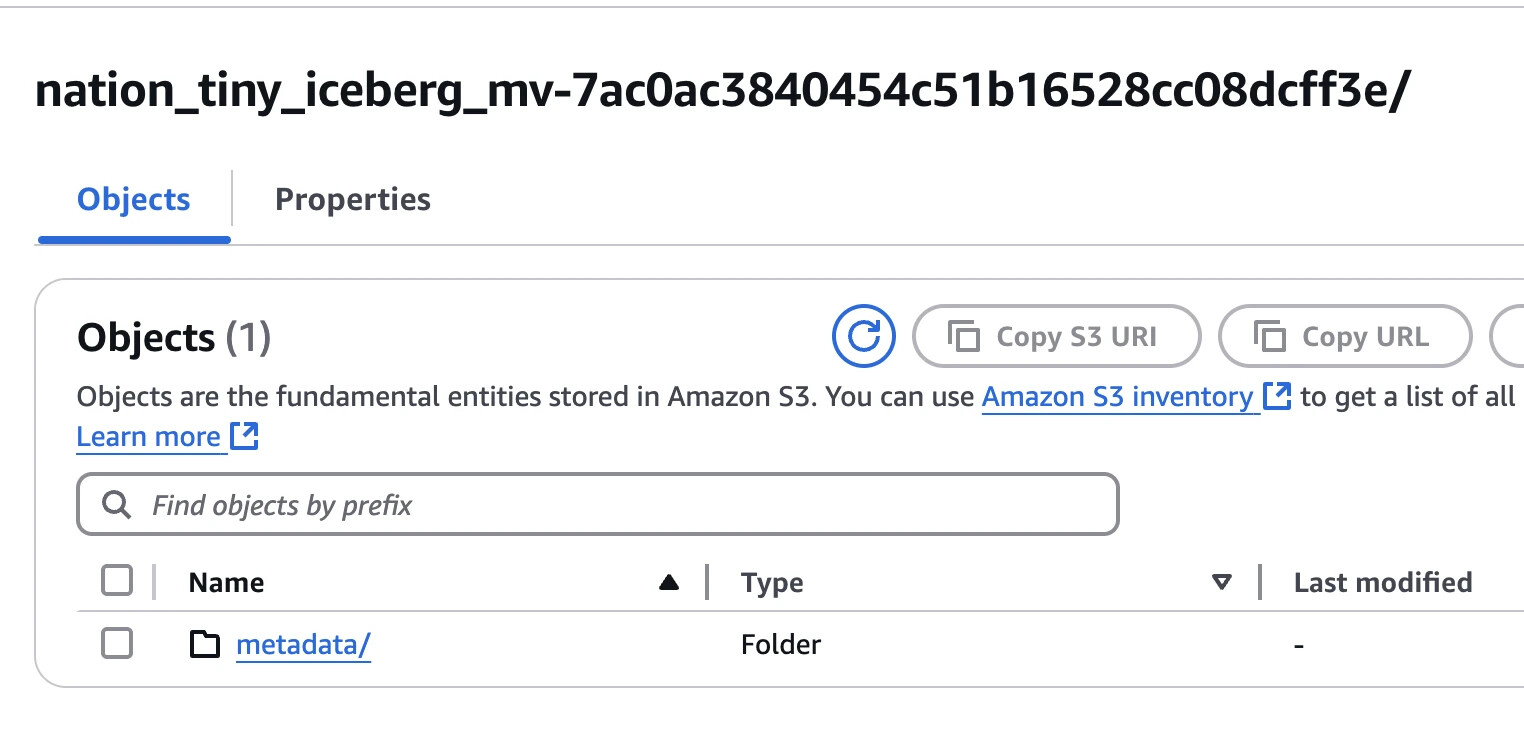
That reflect that fact that we have not refreshed this MV yet.
How to Refresh MV
To get your query really accelerated by materialization you first need explicitly refresh the MV with the respective command:
REFRESH MATERIALIZED VIEW <iceberg_catalog>.<schema_name>.<mv_name>
The command works in a synchronous way, which means REFRESH MATERIALIZED VIEW completes only when Iceberg MV materialization completes and is registered in Metastore. Materialization itself is a usual Iceberg Table with table/column stats automatically collected when table is populated with data. A reference to this Iceberg Table is stored in Iceberg MV metadata sitting in Metastore.
But how does it look at physical level?
S3 storage
After we refreshed the MV you will see that S3 folder now has /data folder created and populated:
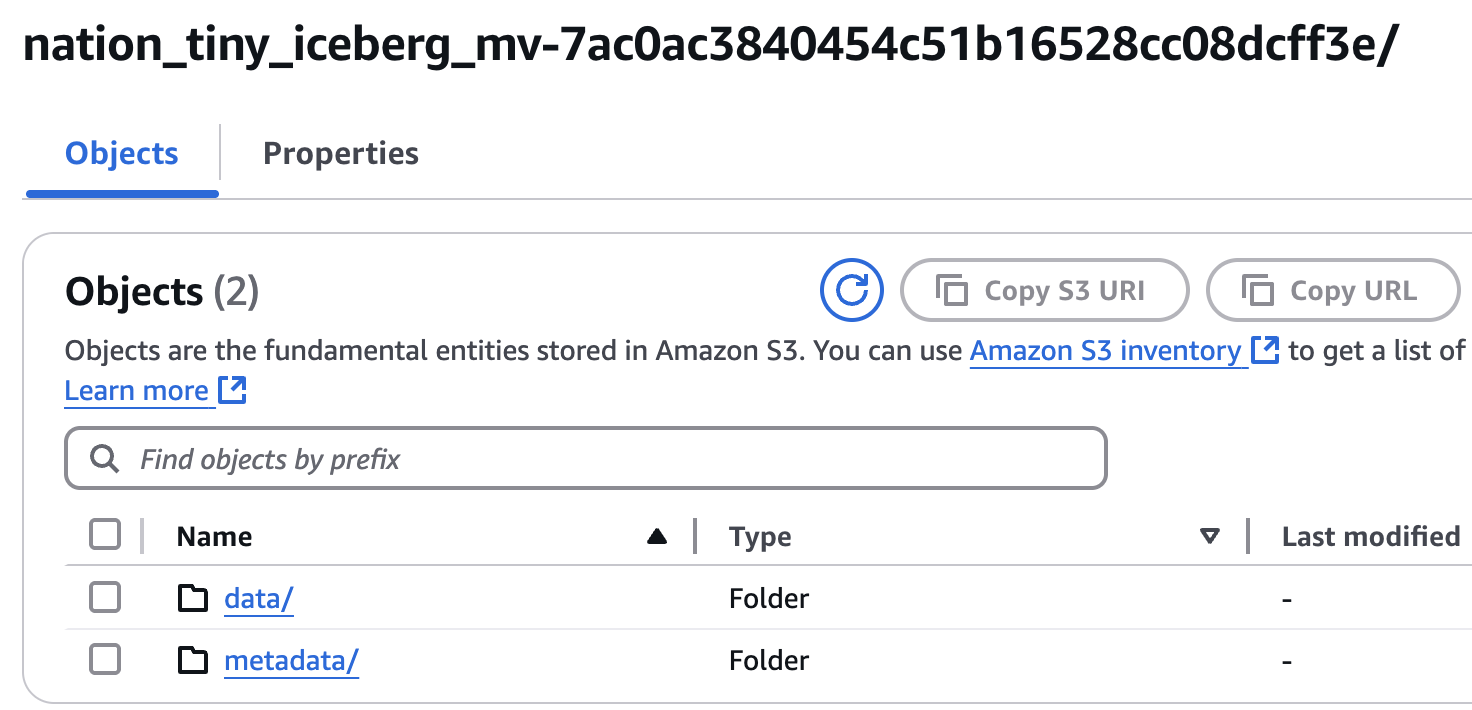
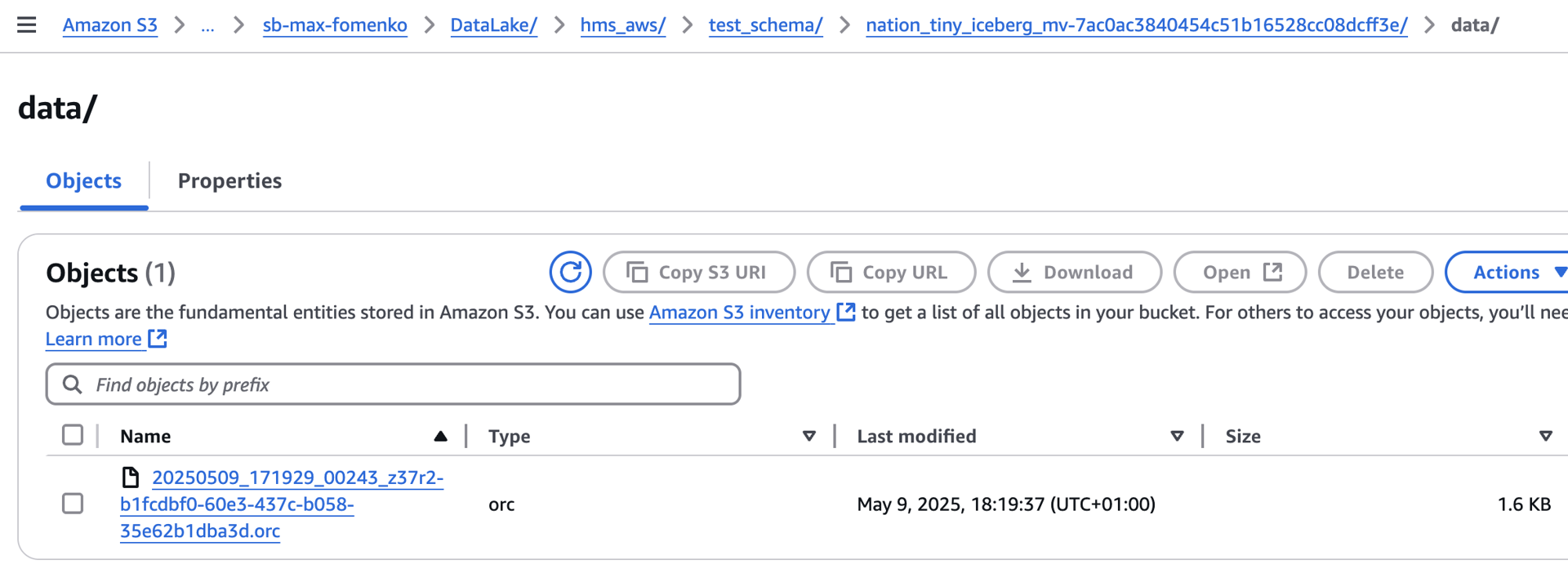
So it is now looking like any other Iceberg Table.
Incremental vs Full Refresh
One of the cool benefits of Iceberg MVs vs Hive MVs is improvements in incremental refreshes. You are no longer restricted on types of changes you can capture (i.e. INSERT / UPDATE / DELETE) or column data types.
Please be aware, that Incremental Refresh only kicks under the following conditions:
- Iceberg MV is defined over SINGLE table as a source
- Iceberg MV is defined over ICEBERG table as a source
- Source Iceberg Table is in same Iceberg catalog as MV
- Only a
TableScan,TableFilterandTableFilterProjectionare allowed in the query plan of the SQL you are materializing.
Iceberg MV is able to capture underlying changes in Iceberg Table thanks to snapshot history of that table. It is generally recommended to use incremental refreshes, unless you are materializing data from non-Iceberg Table or your Iceberg MV refresh schedule is too rare and you did not retain full snapshots history on underlying Iceberg MVs since last MV refresh. It those cases you might still want to do a Full Refresh. To force it you just need to apply a session property:
SET SESSION <iceberg_catalog>.incremental_refresh_enabled=false
and then run usual refresh command:
REFRESH MATERIALIZED VIEW <iceberg_catalog>.<schema_name>.<mv_name>
Please Note!
As of 476 LTS release, only Hive MVs are able to offer incremental refreshes based on delta changes in non-Iceberg datasources like Postgre or Oracle.
Automatic Refreshes
Starting from 471 STS, Iceberg MVs allow scheduling automatic refreshes. How does that work? Do we require Cache Service for that? Do we need to install any new component?
Unlike Hive Connector automatic refreshes do not require Cache Service. Instead it uses a new built-in scheduler that is running on Coordinator (embedded). This means you don’t need to setup any separate component to start using Automatic Refreshes in Iceberg MVs. It also means it is not possible to segregate Scheduler to a different VM or POD like you could with Cache Service.
There is one other difference between automatic materialized view (MV) refreshes in the Iceberg and Hive connectors is the minimum allowed refresh frequency. For the Hive connector, the minimum refresh frequency is 5 minutes, whereas the Iceberg connector allows refresh intervals as short as 60 seconds.
Example:
CREATE OR REPLACE MATERIALIZED VIEW "hms_iceberg"."test_schema".nation_tiny_iceberg_mv
WITH (refresh_schedule = '* * * * *')
AS SELECT * FROM "hms_iceberg"."test_schema"."nation_tiny_iceberg";
Please note!
If you are using automatic refresh schedule you are no longer required to do manual
REFRESH MATERIALIZED VIEW …to get first snapshot generated. It will get created automatically when the first refresh event gets due. (In the example above - 1 minute after the MV creation.
To view the history of automatic Iceberg MV refreshes you can query a system table:
SELECT * FROM <iceberg-catalog>.system.materialized_view_refreshes
Iceberg MV maintenance
In SEP versions before 475 Iceberg MV snapshots are accumulating endlessly. There is no built-in logic to expire them. Also, you are not able to do anything about that with the help of expire_snapshots() procedure:
ALTER TABLE "hms_iceberg"."test_schema".nation_tiny_iceberg_mv EXECUTE expire_snapshots(retention_threshold => '7d')
Results into:
line 36:1: ALTER TABLE EXECUTE is not supported for materialized views
So the only way to do some cleanup was to re-create Materialized View from time to time.
Starting from 475 release, when Iceberg MV refreshes it would automatically cleanup data files that belong to old snapshots. However, this would only apply to the content of /data folder, not /metadata.
Please Note!
Starburst is looking to improve this behavior. Until then, Engineering developed a way for metadata files to be expired by manually adding
delete_after_commit_enabled = trueandmax_previous_versions = 10properties as explained in here (we just have to use Trino equivalent names that were added starting from 480 STS).Complete example for SEP release 480 or later:
CREATE MATERIALIZED VIEW iceberg.analytics.mv_orders_segmented
WITH (
    format = 'PARQUET',
    delete_after_commit_enabled = true,
    max_previous_versions = 10
) AS
SELECT
    o.orderdate,
    o.custkey,
    c.mktsegment,
    SUM(o.totalprice) AS total_price
FROM tpch.sf1.orders  AS o
JOIN tpch.sf1.customer AS c
    ON o.custkey = c.custkey
GROUP BY
    o.orderdate,
    o.custkey,
    c.mktsegment;
What happens when you query Iceberg MV?
Right after creation Iceberg MV they behave like a usual view until materialization has been created. To trigger it you would need to explicitly run:
REFRESH MATERIALIZED VIEW <iceberg_catalog>.<schema>.<view_name>;
Only after successful execution of the above command it gets acceleration by reading data from a materilialized snapshot.
There are two important concepts to be aware:
- Freshness
- Grace Period
Freshness
MV is considered “fresh” if since last refresh underlying tables that it is reading from as per DDL have not been modified since that.
Please Note!
Unfortunately, Iceberg MV is only able to determine underlying table changes if the table is Iceberg Table (thanks to Iceberg Snapshots). For any other tables (coming from Catalogs based on their connectors) that is not possible.
Grace Period
Grace Period is not not used unless you explicitly define it during MV creation:
CREATE MATERIALIZED VIEW <iceberg_catalog>.<schema>.<view_name>
GRACE PERIOD interval '60' minute
AS ...
Now, when we understand those concepts let’s look in depth what happens when you run SELECT query against Iceberg MV, Starburst does a couple of things:
- Fetches an owner of the Iceberg MV.
- Fetches a reference to the latest Iceberg MV materialization (if any)
- Fetches a list of tables used in the Iceberg MV DDL.
- Loops though the list of source tables retrieved in step 3 to validate Security Definer mode.
- Validate freshness of the data in the source tables and decide if it is fresh (only applicable to Iceberg source tables.
Please Note!
- In SEP version prior to 476 LTS this was done sequentially, so the more tables are in the query the longer it takes to perform the checks. Starting from 476 STS API calls to pull metadata for every underlying table are executed in parallel.
- Remark: The fix has been also backported to 474-e.3 LTS.
- Starburst is able to understand data freshness for the Iceberg MV only when SQL query in the MV’s DDL is comprised of Iceberg Tables. That is possible thanks to the history of Iceberg snapshots for each of underlying Iceberg Tables. When tables belong to other connector types where changes in the underlying tables can’t be easily identified - Data Freshness checks are skipped.
- Validate grace period of the Iceberg MV.
- Based on checks in steps 5 and 6 decide whether to supply data from Iceberg MV materialization or ignore materialization and recalculate it on-flight (like if it was a regular View). The decision matrix is provided below:
| # | Ever Refreshed? I.e.: REFRESH MATERIALIZED VIEW iceberg_mv |
Freshness | Grace Period | Source of data for: SELECT * FROM iceberg_mv |
|---|---|---|---|---|
| 1 | No | N/A | N/A | Underlying source tables |
| 2 | Yes | FRESH | Not Defined | MV snapshot |
| 3 | Yes | STALE | Not Defined | MV snapshot |
| 4 | Yes | FRESH | Defined & Has not Passed | MV snapshot |
| 5 | Yes | FRESH | Defined & Has Passed | Underlying source tables |
| 6 | Yes | STALE | Defined & Has not Passed | MV snapshot |
| 7 | Yes | STALE | Defined & Has Passed | Underlying source tables |
Please Note!
The way you define Grace Period for Iceberg MV is also very different from how you do that for Hive MV.
Instead of using
WITH (grace_period = '60m')you should be doing it as explained in the docs. I.e.:
CREATE MATERIALIZED VIEW …
GRACE PERIOD interval '60' minuteGrace Period is counted from the Iceberg MV refresh start time, not end time!
Operations described above obviously impact Query Analysis Time. Therefore you may see additional latency when reading from Iceberg MV vs reading from Iceberg Table created of the same SQL query.
Please Note!
When dealing with Scenario 3 (Stale Data + elapsed Grace Period) you should understand that despite Starburst doing recalculation of the MV dataset on-flight each time you select from the MV, it is not going to materialize that dataset without user explicitly running:
REFRESH MATERIALIZED VIEW ...
Interoperability with other Query Engines
Iceberg Connector with Hive Metastore (HMS)
When you choose to integrate SEP with HMS as your Metastore on the Iceberg Catalog, you gain a fully functional Iceberg Connector, which includes support for Iceberg Tables, Views, and Materialized Views (MVs). However, it’s important to note that Iceberg Views and MVs created from SEP will not be accessible to other query engines connected to the same HMS (e.g., Spark or Impala, etc).
Iceberg Connector with Starburst Data Catalog (SDC)
When you choose to integrate SEP with Starburst Data Catalog as your Metastore on the Iceberg Catalog, you gain a fully functional Iceberg Connector, which includes support for Iceberg Tables, Views, and Materialized Views (MVs). However, it’s important to note that Iceberg Views and MVs created from SEP will not be accessible to other query engines connected to the same Metstore (Spark, Flink, etc).
Iceberg Connector with REST catalog
When you choose to integrate SEP with the Iceberg REST Catalog as your Metastore for Iceberg Connector, you gain access to a reduced-functionality. It still includes support for Iceberg Tables and Views, but not for Materialized Views (MVs), as Iceberg REST Сatalog specification does not support Materialized View management.
However, the Iceberg REST Catalog does support the Iceberg View specification. As a result, the Starburst Iceberg connector allows you to create and use standard Iceberg Views. The specification even supports storing separate DDLs for different engines, but it lacks mechanisms to keep them in sync or to translate between different SQL dialects. Therefore, you should not expect Iceberg views created from SEP to be queryable from other engines.