Iceberg table's files name from table$files and $path don't match

Originally posted on the Trino slack by Moh. Hac.

Hi all, I have a question regarding trino/iceberg, I might be missing some basic understanding of iceberg, would be great to either help with an explanation or point to right article(s)

Let’s say we have an iceberg table in trino named iceberg.core.orders , which is partitioned by report_date. This table is managed by dbt through delete+insert strategy (e.g. we delete the last 10 days of orders and reinsert again incld. latest report_date)

My understanding is that the “$files” metadata table contains all files related to the current snapshot. Nevertheless, running a count distinct on the hidden column “$path”, in the affected orders table, is showing a lower count of files than by querying the “$files” metadata table

select count(distinct file_path)
from iceberg.core."orders$files" f
;
-- higher file count than from the next query

select count(distinct "$path") as file_path
FROM iceberg.core.orders
;
-- much lower count

What am I missing/misunderstanding? How to use only “$files” metadata table to run statistics on file size, size deviation, etc..

Background: We are running statistics on data files for current data and want to use to avoid running full table scan on data tables


TL;DR

This is related to the fact how deletes and updates are handled. Meaning you probably have a single ‘record’ tracked in two files (such as when you do an update) and the $files metadata TABLE shows all those files.

But, when you ask for the $path metadata COLUMN you are only seeing the a single path for a given row (i.e. if the output of an update it would be the path of the last rewrite).

This would make sense if you are doing deletes and then reinserts as the rows that were there before are now in likely THREE, or more, $files (the original data, the deletion marker, and the insert).

SHOW ME

Initial inserts

Load up a table with 1500 records.

create table customer 
as select * from tpch.tiny.customer;

See how many $files are supporting this version of the table.

SELECT substring(file_path, length(file_path) - 20) 
         AS end_of_file_name, 
       file_format, record_count
  FROM "customer$files";

Yep, 1 file that has all 1500 records.

See how many distinct $path values there are.

SELECT distinct(substring("$path", 147)) as end_of_file_name
  FROM customer;

Still just (the same) one.

Delete all records

delete from customer
 where custkey > 0;

Notice that running the $files query again shows 2 files. Each with 1500 records. That’s because the first one has the 1500 initial records and the second one contains the positional deletes that say they are no longer needed. This is because of the Merge-On-Read (MOR) strategy being used.

Conversely, the $path query shows no files are present as there are actually 0 rows in the table in this version and $path is a metadata column, so it isn’t there either.

Insert them again

insert into customer 
  select * from tpch.tiny.customer;

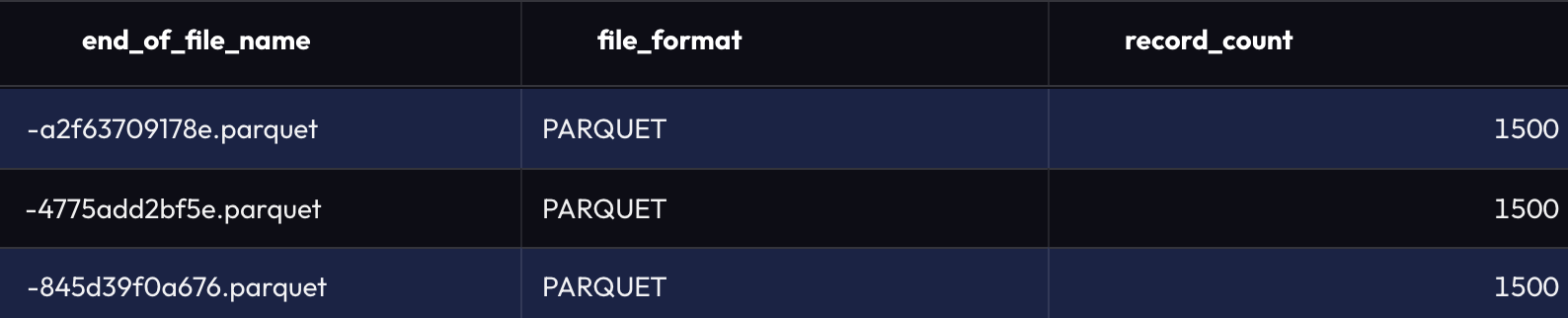
Now there are 3 file names from the $files metadata table – one for the initial 1500 inserts, another for the 1500 deletion markers, and the final file with 1500 net-new records.

And now only 1 file name from $path – notice it is the latest Parquet file from the screenshot above (i.e. the net-new records).

And that’s how the $files and $path values quite easily could be different.