OAuth Token Expiry Challenges in Power BI Integration with Starburst Enterprise

OAuth Token Expiry Challenges in Power BI Integration with Starburst Enterprise

Hi Team,

When using Starburst Enterprise with OAuth2 authentication, we face a recurring issue by design, the OAuth token expires after a short duration (typically 1 hour), and there is no built-in token renewal mechanism within Power BI.

This becomes especially problematic in two scenarios:

  1. Power BI Desktop / Service Usage
    In both Power BI Desktop and SaaS environments, the session dies after the token expires.
    This interrupts user workflows, especially during development or heavy report use.

  2. Scheduled Report Refresh via Power BI Gateway

On Power BI Service, when we configure scheduled refresh using an on-prem Data Gateway, the refresh fails due to token expiration. Currently, there’s no automated way to reauthenticate or renew the token, making it infeasible to run unattended report refresh jobs.

This limitation blocks enterprise-grade reporting automation using Starburst as a data source which is counterproductive, especially when the platform is pitched as enterprise-ready.

Root Cause (as we understand)

The Starburst-Power BI connector is a custom connector, built using Power Query SDK, not a native Microsoft-certified connector. While this gives flexibility, it seems to lack advanced integration for token renewal or secure credential storage compatible with Power BI Service.

Our Concern
We’ve raised this with your Support Team and Customer Success Engineers, but the topic often gets sidestepped, citing known limitations or suggesting we use another BI tool.

But for users heavily invested in Power BI, this is a serious roadblock.

If this issue is not addressed transparently, it raises questions on how well Starburst integrates into real-world enterprise analytics stacks where automation, scheduling, and unattended execution are must-haves.

A Few Asks:

  1. Could your team publish a transparent guide or blog post on this topic? Even if it’s a known gap, openness goes a long way especially when competitors are already discussing these issues in public forums.
  2. Is there a roadmap or workaround in progress for automated token renewal or Service Principal-style auth with Power BI Gateway? ( I’ve noticed there’s another Starburst connector that uses Entra ID (Azure AD) for authentication, but surprisingly, your support team isn’t fully aware of the settings required for it. This raises a few concerns.

If you’re stating that Starburst integrates with Power BI, then naturally, your team should be well-versed with the configuration steps especially for an enterprise-grade connector. When such questions are raised by users, the response shouldn’t be vague or uncertain.

Also, if this integration was part of your alpha or internal testing, then how exactly was it tested? What settings were used? Was Entra ID authentication part of those test cases? It’s important that this clarity is shared otherwise, the claim of Power BI integration feels incomplete.

A proper configuration guide or shared test insights would be very helpful for all enterprise users trying to make this work in real-world reporting pipelines.)

  1. Can Starburst collaborate with Microsoft to push this into the certified connector roadmap even if limited to Enterprise editions?

This is a critical feature for production-grade usage of Starburst in modern data stack environments. We appreciate the innovation your team is building but support for major BI ecosystems like Power BI is essential for enterprise adoption.

Looking forward to a response or even better, a technical discussion on this topic.

Thanks,
Thara
(On behalf of many engineering teams exploring Starburst for analytics reporting)
1 Like
  1. Power BI data connector SDK supports OAuth refresh token, and Starburst customized connector supports it by implementing its API.

Power BI Desktop and Gateway consult custom data connectors for OAuth information, e.g., issuer URL, and initiate the OAuth flows. In addition, if your access token expires, Power BI can get a new one using the refresh token. If your refresh token expires, then Power BI SHOULD initiate a new OAuth flow IMHO.

I am not sure what token expiry issue you are facing. Please specify and/or post the error message here.

Also, take a look at the JWT token your IDP returned. Does that contain access_token as well refersh_token?

Check your SEP configuration, make sure offince_access is specified in http-server.authentication.oauth2.scopes.

  1. Scheduled Report Refresh via Power BI Gateway

Not a good idea to use OAuth here since even refresh tokens will expire in a few days/months. But if you want, take a look at Power BI REST API, it may let you refresh OAuth credentials.

Answers to your asks:

  1. There is no known gap. This is our official page for using Power BI and OAuth config. We noticed that the information is scattered across multiple pages, and we will consolidate it.

  2. Connectors cannot trigger token renewal, and they should not be able to do so; they must be called by Power BI. If you want to renew credentials programmatically, take a look at the Power BI REST API I mentioned before.

The new connector, Starburst secured by Entra ID, is a new connector introduced in the late April release. It does not provide extra functionalities now, compared to the existing Starburst connector, they both provide the same functions. But the new connector will give your SSO (from Power BI Service to SEP) capability once Microsoft enables SSO from AAD authentication-enabled connectors.

I don’t know if there is a pre-defined process from Microsoft, but we run thorough tests before submitting our connector to MSFT for review. Within Power BI Desktop, we run all authentication types, Import and DirectQuery, all data types, multiple viz, and filters against all data types. We also test on Power BI Server + Gateway, making sure all existing connections, data models, and reports continue to work.

  1. Starburst connectors are already certified connectors.
1 Like

Hi @Song_Gao Thanks for the reply.
Here is the error as you requested : ```
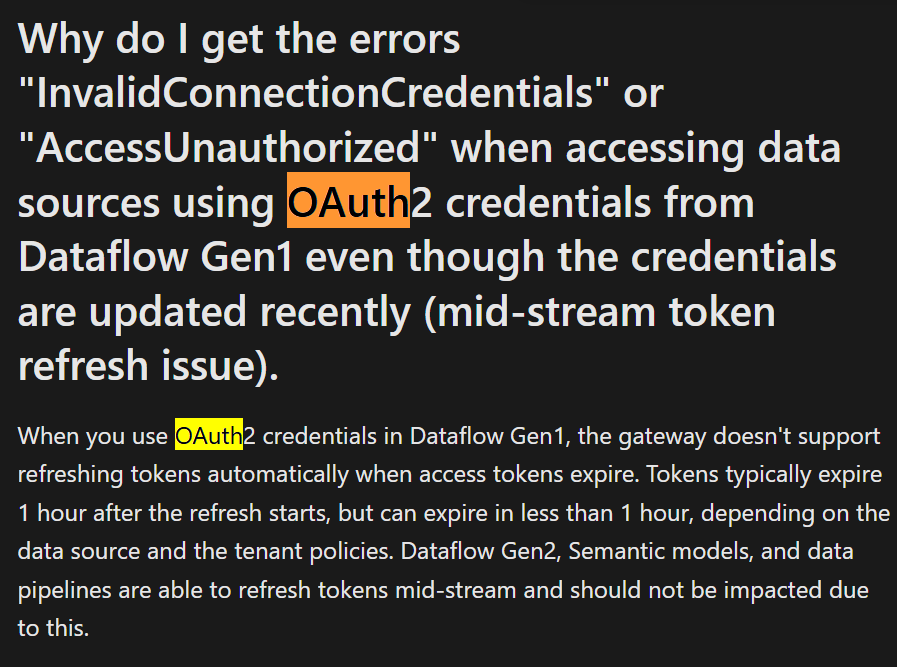
{“error”:{“code”:“DM_GWPipeline_Client_OAuthTokenRefreshFailedError”,“pbi.error”:{“code”:“DM_GWPipeline_Client_OAuthTokenRefreshFailedError”,“parameters”:{},“details”:,“exceptionCulprit”:1}}} or I get the errors “InvalidConnectionCredentials” or “AccessUnauthorized” when accessing data sources using OAuth2 credentials from Dataflow Gen1 even though the credentials are updated recently (mid-stream token refresh issue).
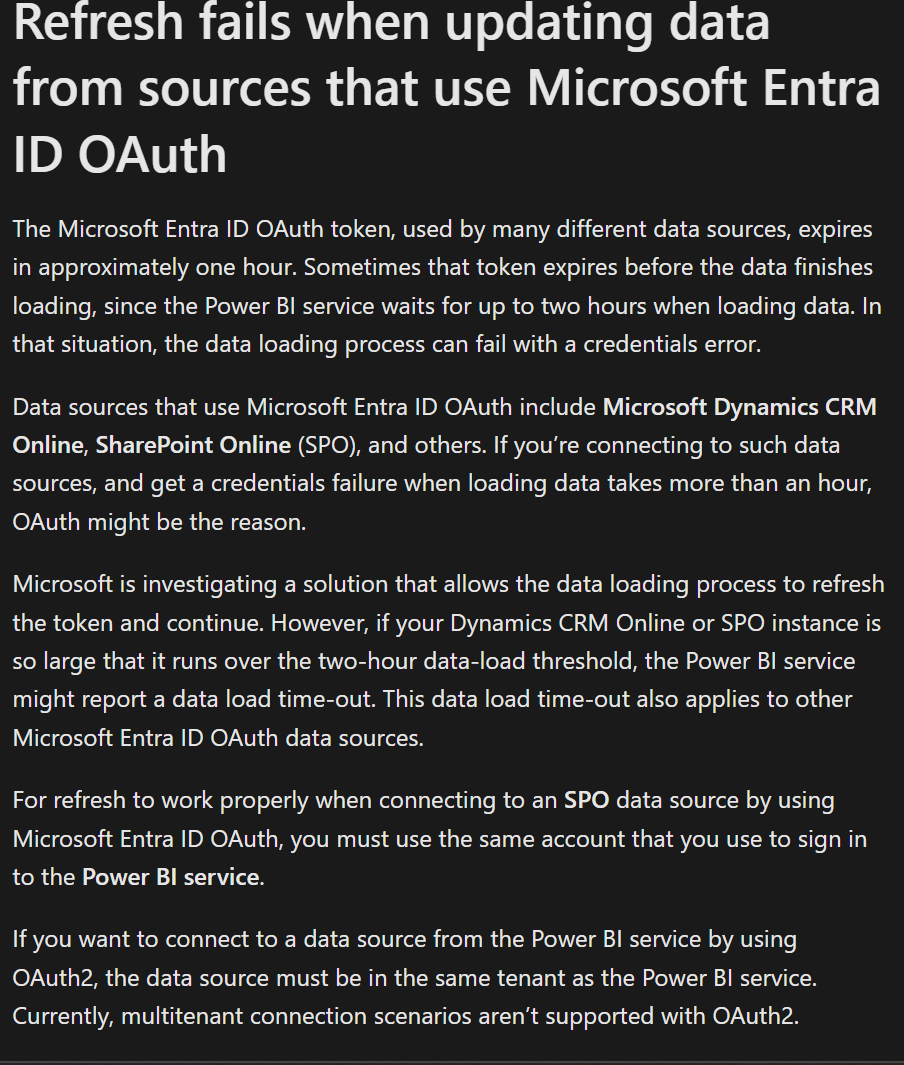
These issues are reffered in power bi documentation as

.
So , with these issues are you suggesting that the above solution still works with starburst .

the other point you mentioned about Also, take a look at the JWT token your IDP returned. Does that contain access_token as well refersh_token?
On the other point you raised — reviewing the JWT token from the IDP to confirm it contains both access_token and refresh_token:
I have a follow-up question. Does relying on a JWT for authentication in this context weaken or bypass the catalog-level security and entitlement policies we have in SEP? If a JWT is issued and then misused by another party, what tracing or auditing options exist to detect where and how it was used. is it is possible?

here is the other issues which is mentioned from Microsoft :

So starburst refresh can happen without falling into these subset of issues

I’ve written a detailed blog post about a broader OAuth issue we’re seeing across multiple scenarios in Power BI:
Why do OAuth-based data sources expire in Power BI Service?

From my experience, there seem to be several combinations where OAuth simply does not work reliably especially when going through the On-premises Data Gateway.

The main pain point for us is with Starburst SEP using OAuth. In our environment, this causes significant problems during dataset refreshes, and we’ve tried multiple approaches based on guidance from your team. However, we keep hitting the same mid-stream token expiry issue that Microsoft has documented for other connectors.

Could you confirm:

  1. Are you aware of these gateway-related OAuth expiry issues in the context of Starburst SEP?
  2. Is there any internal or official documentation from Starburst that addresses these cases? I’ve not found anything in the public Starburst docs that covers this behavior.
  3. Do you have any recommended configuration or architecture patterns for SEP customers who must use OAuth with Power BI gateways?

Given that some organizations are adopting Starburst SEP with OAuth expecting enterprise stability, this limitation is a blocker especially when Microsoft’s own token refresh constraints are already in play.

Looking for your advice as we are adapting SEP and lot of stakeholders mostly mention it as starburst enterprise connector issue. where we discussed with lot of Customer success /technical teams of starburst in our support calls. Actually these evidence or the some acknowledgement on the above mentioned will be useful for us to focus more on the root issue with an supported statements

Any guidance or clarity you can provide will be very helpful for planning our next steps.

@Song_Gao not sure if you got a chance to look into my response. can you please let me know your inputs.

Please double-check and provide your answers. If there is no refresh_token: in your response, then the refresh token won’t work.

There is no direct relationship between logging in the Starburst server and logging the underlying catalogs. It depends on how you secure your catalogs.

Custom data connectors for Power BI, not specific to the Starburst connector, this applies to all connectors using MSFT SDK, connect to your IDP for JWT tokens and pass them to Power BI. I can tell you our connector does not store or use it anywhere. I am sure Power BI does not misuse it either. If you want to track or audit it, contact your network admins or system admins for help.

I may have misunderstood you from the very beginning. So, you were referring to cases where users have connected to Starburst data and are using the same connection for an extended period?

If that is the case, then this is a known limitation. Starburst connector for Power BI is built on top of the Starburst ODBC driver, and the Starburst ODBC driver is built on top of Trino REST API. Once Power BI obtains an ODBC connection, it reuses it over an extended period.

However, the Trino REST API is session-less, which means every time a client sends a query, it must present credentials. So while Power BI thinks the connection is still valid, the access token has expired, and all subsequent queries from the same ODBC connection to the Starbust server will error out.

I am not sure about this. If queris (Power BI needs multiple queries to finish one refresh) can finish within one hour, it should work. Unless the concurrency is low that some queries must be queued after others, and the waiting time is longer than one hour. Or Power BI uses a connection pool and reuses long-parked connections.

1 Like