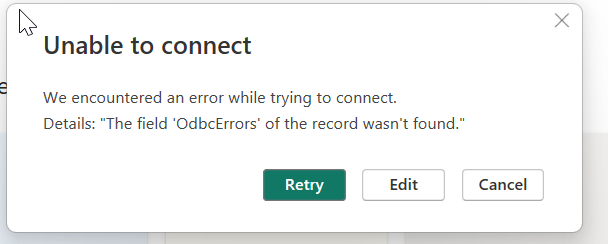
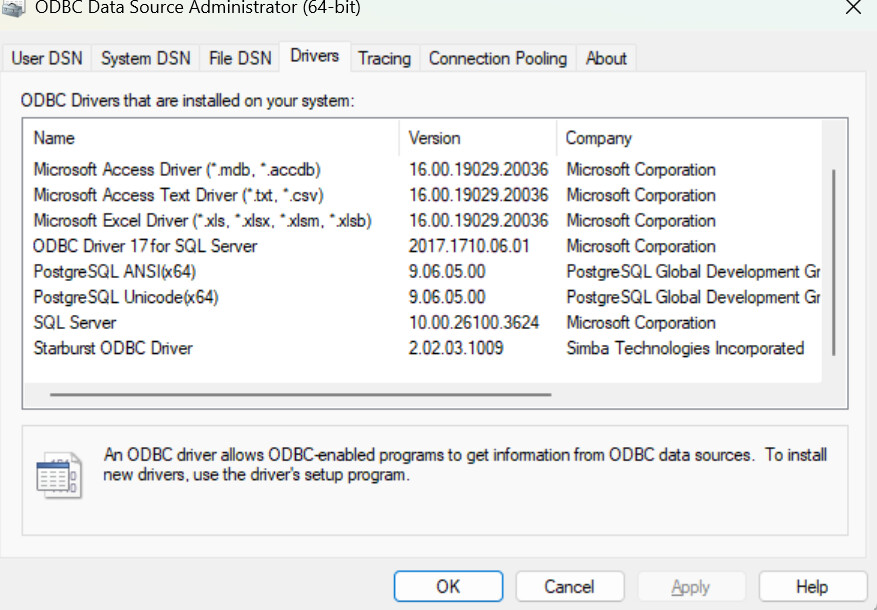
Sorry no, there is no further logfile information. Do you have any specific logfile in mind?
Another question would be: Do you know whether the ODBC Starburst driver is free to use and is the driver able to connect to e.g. stackable trino, too?
From the log:
FirewallDocumentEvaluator/GetResult<Microsoft.Mashup.Evaluator.Interface.IPreviewValueSource> {“Start”:“2025-09-02T09:21:02.4057591Z”,“Action”:“FirewallDocumentEvaluator/GetResult<Microsoft.Mashup.Evaluator.Interface.IPreviewValueSource>”,“HostProcessId”:“19788”,“ProductVersion”:“2.144.1027.0 (25.06)+68a8b7d57a8dc2260d254189dc51b0bd804f76ff”,“ActivityId”:“1608e7a2-4c17-47b1-8429-f914b3b7dd00”,“Process”:“Microsoft.Mashup.Container.NetFX45”,“Pid”:43096,“Tid”:1,“Duration”:“00:00:00.0918997”}
ObjectCacheSessions/Metadata/CacheStats/Access {“Start”:“2025-09-02T09:26:59.5342713Z”,“Action”:“ObjectCacheSessions/Metadata/CacheStats/Access”,“hits”:“9”,“requests”:“10”,“hitrate”:“0,9”,“ProductVersion”:“2.144.1027.0 (25.06)+68a8b7d57a8dc2260d254189dc51b0bd804f76ff”,“ActivityId”:“00000000-0000-0000-0000-000000000000”,“Process”:“Microsoft.Mashup.Container.NetFX45”,“Pid”:43096,“Tid”:1,“Duration”:“00:00:00.0003233”}
SimpleDocumentEvaluator/GetResult/Compile {“Start”:“2025-09-02T09:26:59.5755245Z”,“Action”:“SimpleDocumentEvaluator/GetResult/Compile”,“HostProcessId”:“19788”,“PartitionKey”:“Section1/Query1/Source”,“Expression”:“let\r\n _t = Section1!Query1\r\nin\r\n if _t is table then Table.FirstN(_t, 1000) meta Value.Metadata(_t)\r\n else if _t is list then List.FirstN(_t, 1000) meta Value.Metadata(_t)\r\n else _t”,“ProductVersion”:“2.144.1027.0 (25.06)+68a8b7d57a8dc2260d254189dc51b0bd804f76ff”,“ActivityId”:“33ec2326-29b9-4016-813a-8be806634a0b”,“Process”:“Microsoft.Mashup.Container.NetFX45”,“Pid”:43096,“Tid”:1,“Duration”:“00:00:00.0325378”}
SimpleDocumentEvaluator/GetResult/Evaluate {“Start”:“2025-09-02T09:26:59.6084151Z”,“Action”:“SimpleDocumentEvaluator/GetResult/Evaluate”,“HostProcessId”:“19788”,“PartitionKey”:“Section1/Query1/Source”,“NativeImages”:“mscorlib,Microsoft.Mashup.Shims,Microsoft.Mashup.EventSource,Microsoft.Mashup.Document,Microsoft.Mashup.Client.Models,Microsoft.Practices.Unity,Microsoft.Mashup.DocumentServices,Microsoft.InformationProtection,Microsoft.Mashup.OAuth”,“ProductVersion”:“2.144.1027.0 (25.06)+68a8b7d57a8dc2260d254189dc51b0bd804f76ff”,“ActivityId”:“33ec2326-29b9-4016-813a-8be806634a0b”,“Process”:“Microsoft.Mashup.Container.NetFX45”,“Pid”:43096,“Tid”:1,“Duration”:“00:00:00.0221346”}
SimpleDocumentEvaluator/GetResult {“Start”:“2025-09-02T09:26:59.5754348Z”,“Action”:“SimpleDocumentEvaluator/GetResult”,“HostProcessId”:“19788”,“PartitionKey”:“Section1/Query1/Source”,“Exception”:“Exception:\r\nExceptionType: Microsoft.Mashup.Engine1.Runtime.ValueException, Microsoft.MashupEngine, Version=1.0.0.0, Culture=neutral, PublicKeyToken=31bf3856ad364e35\r\nMessage: [Expression.Error] The field ‘OdbcErrors’ of the record wasn’t found.\r\nStackTrace:\n at Microsoft.Mashup.Evaluator.SimpleDocumentEvaluator.<>c__DisplayClass3_0.b__0(EvaluationResult2`1 result)\r\n\r\n[ DataSourceKind = "StarburstPresto", DataSourcePath = "{""Host"":""starburst-dih-dqe-etu.apps.dso-ekad-test01.rz.bankenit.de"",""Port"":443}", ClientLibraryName = "Starburst ODBC Driver" ]\r\n”,“ProductVersion”:“2.144.1027.0 (25.06)+68a8b7d57a8dc2260d254189dc51b0bd804f76ff”,“ActivityId”:“33ec2326-29b9-4016-813a-8be806634a0b”,“Process”:“Microsoft.Mashup.Container.NetFX45”,“Pid”:43096,“Tid”:1,“Duration”:“00:00:00.0568180”}
FirewallDocumentEvaluator/GetResult<Microsoft.Mashup.Evaluator.Interface.IPreviewValueSource> {“Start”:“2025-09-02T09:26:59.5739990Z”,“Action”:“FirewallDocumentEvaluator/GetResult<Microsoft.Mashup.Evaluator.Interface.IPreviewValueSource>”,“HostProcessId”:“19788”,“ProductVersion”:“2.144.1027.0 (25.06)+68a8b7d57a8dc2260d254189dc51b0bd804f76ff”,“ActivityId”:“33ec2326-29b9-4016-813a-8be806634a0b”,“Process”:“Microsoft.Mashup.Container.NetFX45”,“Pid”:43096,“Tid”:1,“Duration”:“00:00:00.0583082”}